
I’m sharing the best administrative recipe for organizing Google Ads accounts. Messy account structures are an incredibly common problem. And I’m not talking about campaign structure or keyword organization here. Google Ads accounts typically manage substantial budgets. You need to keep things tidy. You can’t allow users to access accounts through their personal email addresses. The number of personal Gmail accounts connected to strategic Google Ads accounts is a real epidemic. Access for sweetie89@gmail.com (the copywriter who wanted to “check what people search for on Google”) or arturo-grand@wp.pl (your boss’s personal email from college) - that’s unfortunately still common practice. Let me show you how to approach this problem.
Who is this for? Everyone
The approach I’m describing works equally well for a small business or startup with just one Google Ads account, and for a large advertising agency with dozens of client accounts. It’s also great for medium and large e-commerce businesses operating in one or multiple markets. It’s worth implementing even if you don’t plan to have more than one Google Ads account.
The Best Google Ads Account Layout
The structure I’m presenting is very simple and follows Google’s philosophy for building account hierarchies. It will probably remind you of the tree-like access structures your IT department uses. This Google Ads account structure addresses:
- account access - if your company owns the account (for business partners, agencies, media houses, employees, accountants, etc.)
- account access - if your account is managed by an agency/media house
- eliminating (problematic) credit card and bank transfer billing
- managing multiple Google Ads accounts
- managing multiple Google Ads users
- linking accounts together
- linking accounts with other Google services
Google Ads Account Structure
It consists of the following parts:
- User account (Google account)
- Google Ads Manager account (formerly known as MCC)
- Google Ads account - one or more
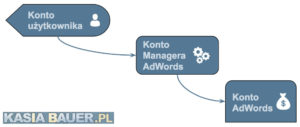 You achieve this structure by adding a parent Manager account to your existing Google Ads account. The Google Ads account is where your campaigns live. The parent account is a Google Ads Manager, which is an account for managing multiple accounts. It doesn’t have the ability to create campaigns. It’s an operational-administrative entity with a range of other useful features. You then grant access to users (regular Google user accounts) through the Manager account. Later in this article, I’ll show you where these accounts connect and where they appear in larger quantities within the structure. You’re probably thinking:
Why do I need this extra artificial thing called a “Manager account”? I can just add users directly to the Google Ads account… right? Seems like overkill.
You can, but it’s a short-term play. Google Ads is the primary or at least strategic traffic source for most projects. One account often isn’t enough, and the need for another one comes up quickly (for various reasons). Two Google Ads accounts without a Manager account is a major inconvenience and simply impractical.
Reasons to Implement This Structure
Primarily because it’s very flexible and provides maximum security and convenience. Additionally, it allows for further rapid development of the structure without major modifications to the existing layout. By eliminating credit cards and prepayments, it also ensures campaign continuity.
Maximum Security
You might be thinking:
Why should I create separate user accounts when I can just give the Google Ads login and password to 2 or 3 people?
That’s a very dangerous idea. In that scenario, we can’t match the Google Ads access level to the user’s actual competence. Google Ads is one of the more complex admin panels out there. Inexperienced users can feel lost and cause significant damage through a simple mistake or misclick. For such users, we grant read-only access - access to view the account without the ability to edit (make changes to campaigns). For an accountant, you can simply add their work email to receive invoices. When you start managing users this way, nobody feels excluded from access, and at the same time, you can be sure nothing bad will happen. When sharing an account where everyone has the same login and password, change history is a critical issue. Since we’re operating under one login, we can’t determine who made consequential changes. It’s not about figuring out who made the mistake so we can fire them - it’s about identifying which login made the changes so we can detect them, train the user, and prevent such mistakes in the future. One of the more painful access abuse incidents I witnessed involved someone hijacking a user account password. Two days later, we discovered that a five-figure amount had been spent on a campaign none of us had created. The campaign was set up for expensive keywords driving traffic to a website we didn’t recognize. Thanks to a good account structure, we were able to quickly trace the cause, cut off access, and report the crime. Thanks to this separation, we weren’t at risk of being locked out of the account (if the intruder had changed passwords), because they only had user-level access. We prevented further uncontrolled spending in the following days and weeks.
Easily Expandable Structure
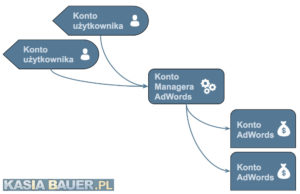
With this structure, you can easily add new users with different permissions (figure below). 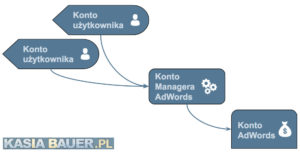 You can also add new Google Ads accounts for testing purposes, for external entities (an agency or media house that wants to run Gmail ads or a YouTube campaign for you), or for new markets where you want to receive invoices in a different currency under a different entity. There are many reasons, and this layout supports all of them (figure below).
  You can also easily add another branch, where a different entity/department has access to operate independently but without access to other accounts (figure below).
 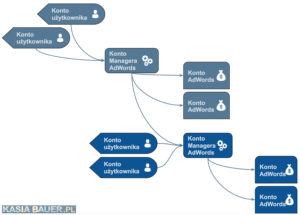 You can also grant parallel access, where such access is possible but competency areas are clearly defined - Group A accounts and Group B accounts (figure below).
 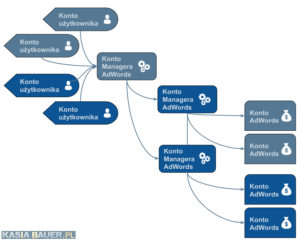 Then you can keep adding more and more branches (figure below).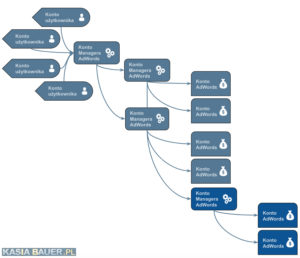
Credit Line
A credit line is a lifesaver! You want one because there’s no point in constantly relying on your boss’s or board’s credit cards. You also don’t want to fight with accounting for a dedicated card for Google Ads. If you share a credit card with the rest of the company, you’ll inevitably hit the transaction limit because someone bought something without telling anyone, or search volume spiked unexpectedly and nobody thought about it. So get yourself a credit line. Google Ads credit can only be assigned to a Manager account. No more card hassles, bank transfers, accounting issues, or surprise purchases - and you’ll look good for managing cash flow, since invoices are issued at the end of the month with 30-day payment terms. Creating new accounts is also more pleasant and faster - you connect them to the existing credit line and start working. Google Ads Credit Line - How It Works
Convenience and Speed
With a Manager account in the structure, you can freely switch between Google Ads accounts. No more opening two browser instances (Chrome default and Chrome incognito, or a different browser). Just pick the account from the list and go. This applies to all users connected to the structure (figure below). 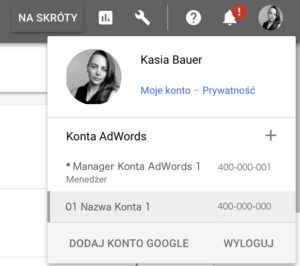 When a new user needs access quickly, you don’t need to think long - just collect the information about which account they need access to and grant it, because the structure is ready. You can also grant minimal access, for example to just one account. If the user needs broader access, you simply move them higher in the account tree without their involvement. Creating another Google Ads account within the existing structure is very easy - you simply add it in the Manager account. You can even do it without creating a new email address (in a company domain, which sometimes takes time) and connect it to the existing credit line.
Gmail-Based Accounts Are Trouble
The worst approach of all is running Google Ads accounts based on Gmail accounts. And it’s even worse when those Gmail accounts are personal ones. On top of that, users logging in with their personal Gmail (because “it’s more convenient”) create several problems. First, these are personal accounts. They’re certainly connected to smartphones. So our colleagues are logging in with these accounts wherever there’s Internet - including free Wi-Fi, which is notoriously insecure. Nothing stops an employee on vacation from sharing photos, and that Gmail account is connected to a Google Ads account spending five figures a month. Not funny. Account administration is also a nightmare. Imagine director Henry leaves the company - now try finding his Gmail among all the sweetie77@gmail.com, bartolov@gmail.com, and fireflaj00@gmail.com accounts out there. See how to create a Google account without Gmail - guide.
Two-Factor Authentication
There’s also two-factor authentication, which you can leverage in Google Ads. More info. 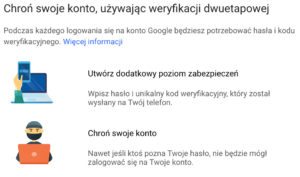 This is an option available in every Google account that significantly increases security. I recommend implementing it for accounts with the highest (administrative) access levels. For daily-use accounts, you can skip it (for convenience) - but only if they don’t have the ability to lock you out of the account, for example with standard access and below.