
If you’re running Claude Code on anything beyond a chat window — sub-agents, long sessions, automated pipelines — you’ve probably stared at your usage dashboard and asked: what configuration would do the same job, but cheaper?
This is the experiment I ran to answer that for myself. Six controlled configurations on the same engineering ticket. Two models, three prompt shapes. Identical environment, identical task, identical acceptance criteria.
The headline:
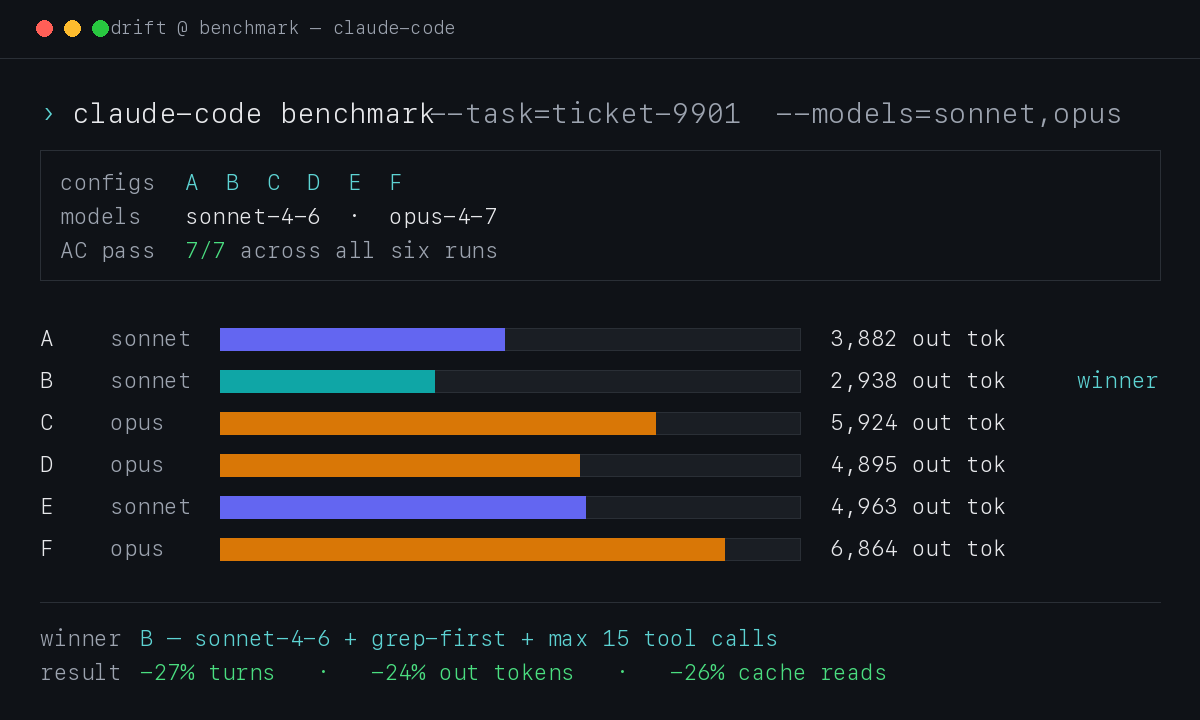
Sonnet 4.6 + a 4-bullet “efficiency addendum” beat every other configuration on output tokens, turns, cache reads, and wall-clock time — without giving up any quality. The same model unprompted dropped 27% of turns and 24% of output tokens once I added the prompt. Opus 4.7 used 1.5–2× more tokens than Sonnet on the same task, with no AC improvement.
Below: the setup, the numbers, the prompt I’m now putting into production agents, and a few results that surprised me.
Where this came from
I’ve been building Drift — a private agent runner I can hand work off to. The idea is selfish and simple: file a ticket from my phone while I’m out walking the dog, the agents pick it up, do the work, and the diff is waiting when I’m back at the desk.
Every ticket costs tokens. Sonnet vs Opus, with or without prompt tuning — the bill swings 2–3× on the same job. Before I scale Drift to larger client projects, I wanted hard numbers on which configuration is cheapest at equal quality.
Hence the A–F benchmark.
What was measured (and why these models)
Two models × three prompt shapes = six configurations:
| Config | Model | Prompt shape |
|---|---|---|
| A | Sonnet 4.6 | standard (baseline) |
| B | Sonnet 4.6 | grep-first + max 15 tool calls |
| C | Opus 4.7 | standard |
| D | Opus 4.7 | grep-first + max 15 tool calls |
| E | Sonnet 4.6 | parallel tool batching |
| F | Opus 4.7 | parallel tool batching |
Why these two models? Sonnet 4.6 is the workhorse — fast, cheap, good enough for most coding tasks. Opus 4.7 is positioned for harder reasoning but costs roughly 5× more per token. The whole point of the test was to find out whether Opus actually earns its price on routine engineering work, or whether Sonnet plus a smarter prompt covers the same ground for less.
The three prompt shapes:
- Baseline — the standard system prompt my agents already use, no extras.
- Efficiency addendum — a 4-bullet block telling the agent to grep before reading, read only what it needs, and cap total tool calls at 15. (Full text further down.)
- Parallel batching — a different addendum encouraging the model to call independent tools in the same turn instead of sequentially.
The metrics I tracked:
turns— model → tool → model roundtrips the agent tookoutput tokens— what I’m billed for on the response sidecache read— context the model re-fetched from cache (a proxy for context bloat)time— wall-clock durationAC— acceptance criteria passed, out of 7
The task was a realistic engineering ticket: add per-type concurrency limits to a 3,000-line Python worker. Seven mechanically verifiable criteria — constants, function signatures, log strings, syntax check via ast.parse. Not trivial (the agent has to navigate a big file and refactor the main loop), but not architecture from scratch either. A decent proxy for a typical implementation ticket.
Round 1 — three configs to validate the rig
I started with three configurations to confirm the test setup before running the full matrix:
| Config | Model | Prompt | AC | Turns | Out tok | Cache read |
|---|---|---|---|---|---|---|
| A | Sonnet | standard | 7/7 | 24 | 3,744 | 864 K |
| B | Sonnet | grep-first + max 15 tool calls | 7/7 | 19 | 3,276 | 640 K |
| C | Opus | standard | 7/7 | 33 | 7,590 | 1,584 K |
Two takeaways:
- The prompt addendum works. B used 21% fewer turns and 13% fewer output tokens than A — same model, same task, same final quality.
- Opus is expensive — and not better here. Same 7/7 AC, but 2× the output tokens and 2.5× the cache reads of Sonnet baseline. On a well-defined ticket with verifiable AC, Opus has no edge.
Round 2 — the full A–F matrix
Each configuration ran on a fresh git worktree from the same commit. Fresh context, no cross-contamination:
| Config | Model | Prompt | AC | Turns | Tools | Batched | Out tok | Cache read | Time |
|---|---|---|---|---|---|---|---|---|---|
| A | Sonnet | standard | 7/7 | 22 | 13 | 0 | 3,882 | 769 K | 55s |
| B | Sonnet | grep-first + max 15 tool calls | 7/7 | 16 | 11 | 0 | 2,938 | 566 K | 50s |
| C | Opus | standard | 7/7 | 29 | 16 | 0 | 5,924 | 1,427 K | 80s |
| D | Opus | grep-first + max 15 tool calls | 7/7 | 17 | 10 | 0 | 4,895 | 793 K | 60s |
| E | Sonnet | parallel batching | 7/7 | 34 | 20 | 0 | 4,963 | 1,204 K | 80s |
| F | Opus | parallel batching | 7/7 | 27 | 18 | 0 | 6,864 | 1,270 K | 80s |
What the numbers actually say:
- B wins outright. Lowest on every cost metric. 27% fewer turns and 24% fewer output tokens than baseline Sonnet, AC unchanged.
- The efficiency prompt helps Opus too. C → D: 29 → 17 turns (−41%), 5,924 → 4,895 output tokens (−17%). Both models listen.
- Parallel batching backfired on Sonnet. E was worse than baseline A — 34 turns vs 22, 4,963 vs 3,882 output tokens. The instruction triggered extra planning narration without producing any actual batched calls.
- Zero batched turns across all six configs. The “Batched” column is all zeros. The model decides batching, the prompt doesn’t force it.
Opus listens to the prompt — and still loses to Sonnet on every metric.
The test environment — for anyone wanting to replicate
A clean benchmark means none of the run leaks into your real systems. Three pieces made that work:
Git worktrees, one per config. Each agent got its own working copy of the repo, branched from the same commit:
git worktree add /tmp/exp/wt-A HEAD
git worktree add /tmp/exp/wt-B HEAD
# ... C, D, E, F
Same source, six isolated workspaces. The agent could grep, read, edit, hammer the codebase — nothing ever touched the production checkout, nothing got merged back. After each run, the worktree was reset to HEAD so the next agent started clean.
A fake HTTP server in place of the real API. Drift’s agents normally call a REST API to mark tickets started, log progress, mark them done. For the experiment I stubbed that with a minimal server that accepted every call and ignored the payload:
GET   /api/tickets/9901           → returns a fake ticket
POST  /api/tickets/9901/events    → 200 OK (drops payload)
PATCH /api/tickets/9901           → 200 OK (drops payload)
No production database, no real workers triggered, no risk of the experiment accidentally promoting itself to reality. The agent thinks it’s doing the job; the system swallows the result.
Why not just run it on production data? Two reasons:
- Reproducibility. Production tickets have history — comments, prior attempts, real diffs. Hard to make six runs truly identical.
- Safety. Six unsupervised agent runs on the same ticket would race each other, double-write, corrupt state. Worktrees plus the fake server made parallel runs safe and identical.
The prompts (for anyone wanting to copy them)
The efficiency addendum (configs B and D — the winner):
## EFFICIENCY INSTRUCTION

Work linearly and minimally:
1. ALWAYS grep/search before opening a file —
   don't read a file "to see what's in it"
2. Read only the fragments you need
   (use offset+limit in Read)
3. Don't explore around — if AC says
   "add a function near line 302", go straight there
4. Cap: 15 tool calls total.
   After 15, finish with what you have.
Four bullets. That’s it. −27% turns, −24% output tokens, AC unchanged.
The parallel batching addendum (configs E and F — the one that backfired):
## PARALLEL TOOL USE INSTRUCTION

When you have multiple independent operations —
call them all in one turn, not sequentially.
This applies to reading different fragments of the
same file (Read offset=0, Read offset=300,
Read offset=3100 at once) and to independent
greps or checks across different files.
The model understood the intent (you can see it narrating what it’ll do in parallel), but the output stream contained zero batched tool calls in any of the six runs. Prompt-level batching looks like a non-feature in -p mode.
A few things that surprised me
-
The cheapest config is also the fastest. B finished 5 seconds quicker than A. Less exploring → less wall-clock time, not just fewer tokens.
-
Opus + the efficiency prompt (D) is still more expensive than Sonnet baseline (A). D burned 4,895 output tokens; A burned 3,882. If you’re paying for Opus and tuning the prompt, you’re still spending more than untuned Sonnet — and getting the same AC.
-
All six runs passed 7/7 AC. This is important context: I measured “cheapest at equal quality”, not “best quality”. On a fuzzy task with no verifiable AC, Opus might still pull ahead. On well-defined engineering tickets, it doesn’t.
-
Parallel batching is a real Claude Code feature — but model-decided, not prompt-forced. The CLI has no flag for it. The API has
tool_choice, but Claude Max subscribers don’t get that through the CLI. So for now: it happens when the model decides it should, and adding “please batch” to the prompt just generates more text about batching. -
Two rounds, two winners — same one. I ran the benchmark twice for sanity. Different days, different worktrees, same task, same result: B wins, by similar margins. The conclusion isn’t a one-off coincidence.
What I’m doing with this
Drift now ships with the efficiency addendum in every implementation-type ticket. The 4-bullet block lives in the worker config and gets concatenated to the system prompt before each agent runs. Same model, same task, roughly 25% less cost per ticket. I’d take that.
For larger projects — where the agent is reading across many files and writing across multiple modules — I’ll re-run the benchmark before assuming the same prompt still wins. The current claim is narrow but solid: on a well-defined implementation ticket against a known codebase, Sonnet plus grep-first beats every other Claude Code configuration I tested.
If you’re running Claude Code in any kind of automated pipeline and you have a verifiable test case, run the benchmark on your own task before picking a model. The defaults aren’t the cheapest. The most expensive isn’t the best. And a four-bullet prompt addendum can save a quarter of your token bill before you even change models.